Free Background Remover Online
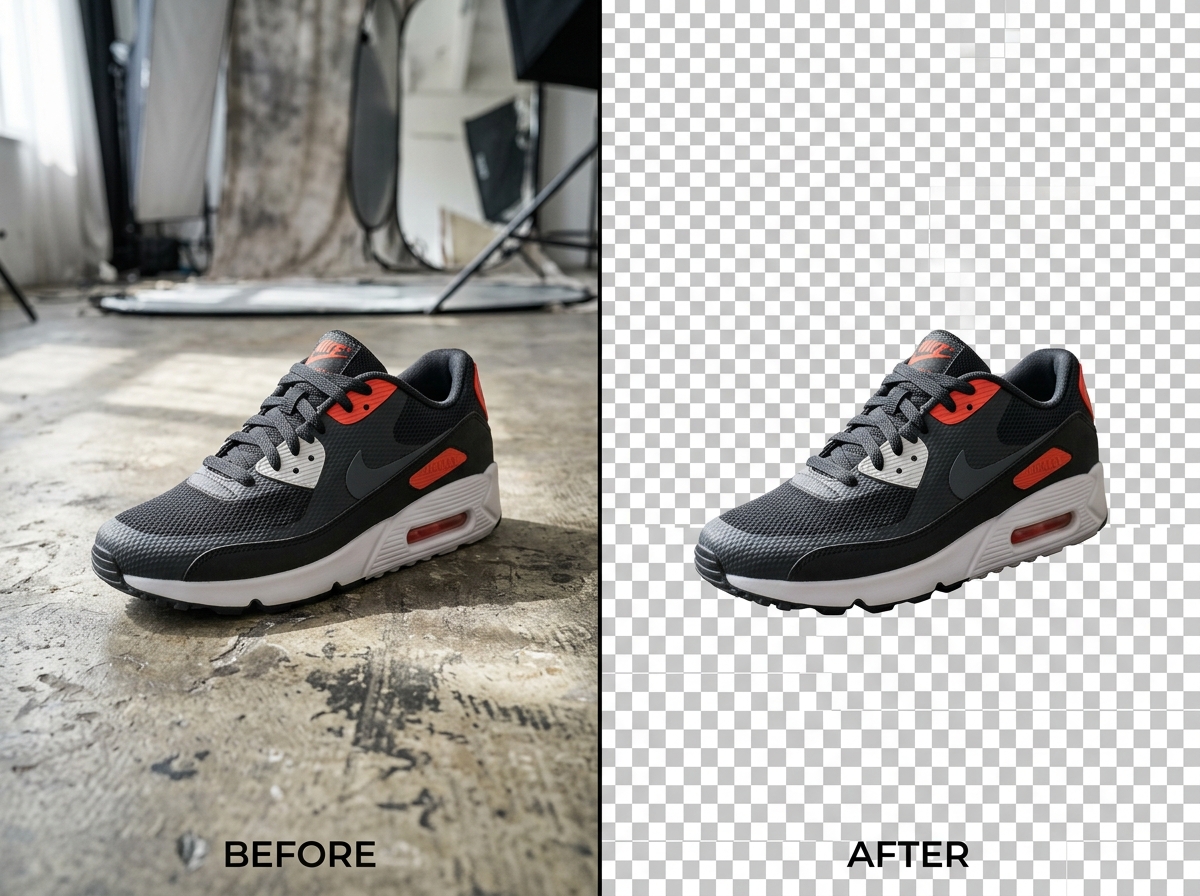
Looking for a fast, reliable background remover to isolate subjects and create clean cutouts? Expeditious Tools provides an intelligent image background remover that enables you to remove background from image online in seconds without installing desktop software. Whether you need a transparent cutout for an e-commerce storefront, a professional headshot for your LinkedIn profile, or crisp promotional graphics for social media campaigns, our bg remover produces high-resolution transparent PNG cutouts effortlessly.
How to Remove Background from an Image
Removing the background from photos online is simple and requires only three straightforward steps:
Upload Your Image
Drag and drop your photo into the upload area or click "Choose Image" to select a file from your device. You can also paste an image directly using Ctrl + V. Supported formats include PNG, JPG, JPEG, and WebP up to 5 MB.
Remove the Background
Click "Remove Background". Our automated vision model identifies the main subject, distinguishes foreground edges from the surrounding scenery, and erases the background cleanly. Advanced users can tune alpha matting for intricate hair or fur boundaries.
Download Your Transparent Image
Preview the transparent result on a checkerboard, white, or dark backdrop using the interactive before/after slider. Click "Download Transparent PNG" to save your high-resolution cutout immediately to your computer or phone.
Why Use Our Background Remover?
Modern digital workflows demand speed, precision, and simplicity. Here is why creators, developers, and store owners rely on our free background remover:
Free Background Removal
Access full background-erasing capabilities at zero cost. Unlike many online tools that place heavy watermarks over your images or force you onto paid subscriptions to download high-resolution outputs, Expeditious Tools lets you export transparent PNGs completely free.
Easy Online Background Removal
Our online photo background remover runs entirely in your web browser. You do not need to install bulky desktop editing software, learn complex selection tools, or configure third-party plugins. It works smoothly across desktop browsers, iPads, and mobile smartphones.
Transparent PNG Output
Background-stripped images are rendered with full alpha-channel transparency and exported in standard PNG format. This makes them immediately composable onto new website layouts, custom graphics, marketing banners, or colored canvas layers.
No Signup Required
Start editing instantly without creating an account, entering an email address, or submitting credit card information. Your workflow remains frictionless from the moment you land on the page until you download your finished cutout.
Background Remover for Different Uses
A dependable picture background remover is essential across numerous creative, commercial, and personal applications:
Product Photos
Extract merchandise, shoes, jewelry, and packaged goods onto clean transparent backdrops. Perfect for meeting white-background requirements on major marketplaces like Amazon, eBay, Shopify, and Etsy.
Profile Pictures
Upgrade your personal avatar, resume photo, or LinkedIn headshot by removing distracting household backgrounds, office clutter, or uneven outdoor lighting.
Social Media Images
Craft eye-catching YouTube thumbnails, Instagram story cutouts, TikTok stickers, and promotional posters by isolating key subjects and blending them onto vibrant graphic backgrounds.
E-commerce Images
Ensure visual uniformity across your digital catalog. Replacing varied lighting and inconsistent backgrounds with a standardized transparent or pure-white aesthetic improves customer focus on product details.
Marketing Graphics
Isolate brand assets, logos, product mockups, and client portraits to assemble clean digital ads, email campaign banners, and presentation pitch decks with consistent branding.
App & Web Design
Streamline front-end asset creation. Need to optimize your PNG after removing its background? Pair this tool with our online image compressor to shrink file size for faster page load times.
How Does Image Background Removal Work?
Modern automated background remover for images relies on deep learning architectures known as salient object detection (SOD) and boundary segmentation networks. Rather than depending on simple color-keying or magic-wand tolerance sliders, the model analyzes pixel patterns, contextual spatial features, depth cues, and contrast gradients to discern where the foreground subject ends and the backdrop begins.
Our tool utilizes proven computer vision architectures including u2net (U-Square Net), a deep nested U-structure designed to capture both multi-scale contextual features and high-resolution boundary details without severe downsampling. For portrait photography, specialized portrait segmentation models focus on human contours. When dealing with semi-transparent pixels—such as flying strands of hair, fine animal fur, or translucent fabric—our optional Alpha Matting algorithm computes smooth alpha opacity gradients between foreground and background threshold values, preventing harsh jagged edges.
Background Remover vs Manual Editing
Wondering how our online tool compares to traditional photo editing suites? Here is a side-by-side comparison:
| Feature / Workflow | Expeditious Tools Background Remover | Manual Desktop Software (e.g., Photoshop) |
|---|---|---|
| Speed to Result | Seconds (fully automatic) | 10 to 30 minutes of manual pen-tool tracing |
| Skill Level Required | Beginner friendly (1-click upload) | Requires professional graphic design experience |
| Cost & Licensing | 100% Free | Expensive recurring monthly subscription |
| Installation Required | None (runs in any web browser) | Multi-gigabyte desktop software installation |
| Mobile Compatibility | Fully responsive on iOS and Android | Limited mobile app workflows |
| Transparent PNG Download | Included by default | Requires manual export configuration |
Frequently Asked Questions
Have questions about removing image backgrounds? Find clear answers to common inquiries below: